In this article, we will show you how to build a chatbot that can understand technical documentation and chat with users about it. We'll use distilabel, a Python library for synthetic data generation and AI feedback using LLMs, to create a conversational model that's both accurate and engaging.
**Generating Synthetic Data for Fine-Tuning Custom Embedding Models**
To fine-tune a domain-specific embedding model, we need to generate synthetic data. We can use distilabel to generate sentence pairs from the technical documentation of Argilla 2.0. This will allow us to create a dataset that's tailored to our specific needs.
**Downloading and Chunking Data**
Before we can generate synthetic data, we need to download and chunk the data. We'll use llama-index to read the repository contents and parse the markdown files. Specifically, we'll use MarkdownTextSplitter and MarkdownNodeParser to divide the text into manageable chunks of approximately 256 tokens each.
**Generating Synthetic Data for Our Embedding Model**
Now that we have our dataset, we can generate synthetic data using distilabel's GenerateSentencePair step. This will create a new dataset with sentence pairs that are tailored to our specific needs.
**Fine-Tuning the Embedding Model**
Once we have our synthetic dataset, we can fine-tune our embedding model using SentenceTransformer and CrossEncoder. We'll define the loss function and training strategy, then train and save the final model.
**The Vector Database**
To store and retrieve the documentation, we'll create a vector database using SentenceTransformer's encode method. This will allow us to efficiently store and retrieve the embeddings of our documents.
**Creating Our ChatBot**
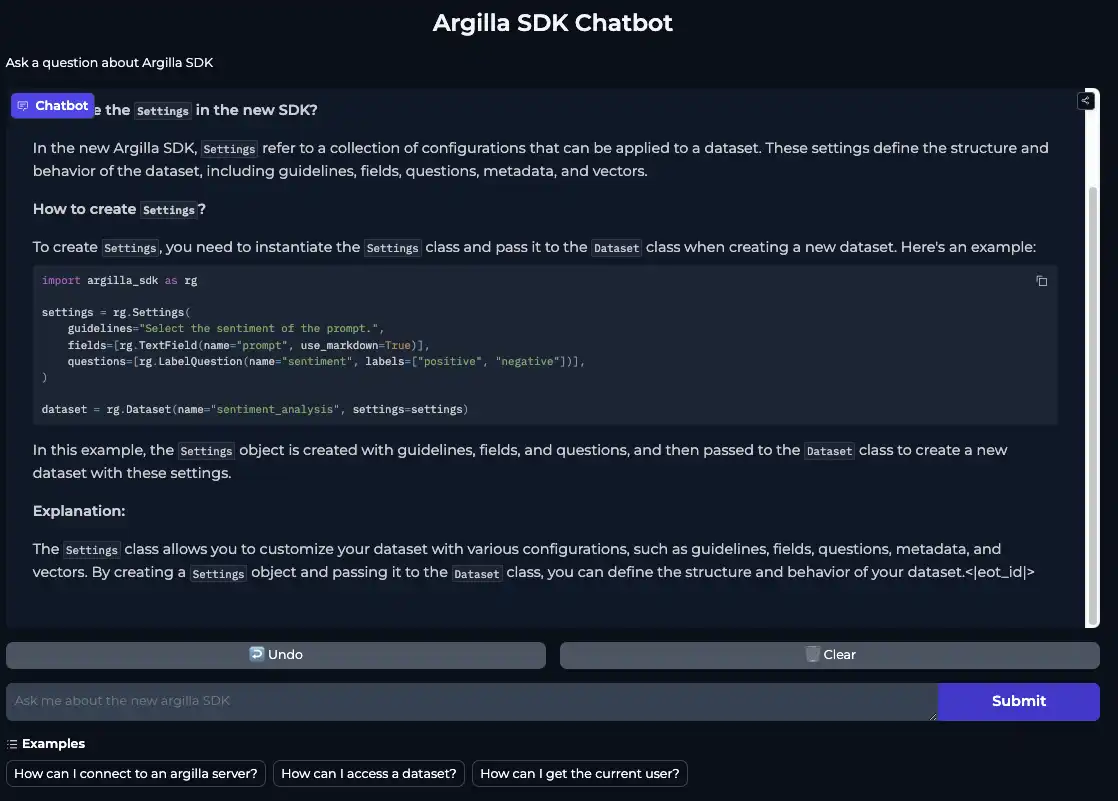
Now that we have our fine-tuned embedding model and vector database, we can create our chatbot. We'll use Gradio to deploy our app on Hugging Face Spaces, allowing users to interact with it and storing the interactions in Argilla for continuous evaluation and improvement.
**Playing Around with Our ChatBot**
We can now put our chatbot to the test by asking it questions about Argilla 2.0. We've provided some default queries to get you started, but feel free to experiment with your own questions.
**Next Steps**
In this article, we've shown you how to build a chatbot that can understand technical documentation and chat with users about it. However, there are many ways we can improve and expand its capabilities. Here are some possible next steps:
- Improve the chunking strategy: Experiment with different chunking strategies, parameters, and sizes to optimize the chatbot's performance and response quality.
- Implement deduplication and filtering: Add deduplication and filtering mechanisms to the training dataset to remove duplicates and irrelevant information, ensuring that the chatbot provides accurate and concise responses.
By following these steps, you can unlock your chatbot's full potential and explore new possibilities in AI development.
**Key Facts**
- We used distilabel to generate synthetic data for fine-tuning a custom embedding model.
- We created a vector database using SentenceTransformer's encode method to store and retrieve the documentation.
- We deployed our app on Hugging Face Spaces using Gradio, allowing users to interact with it and storing the interactions in Argilla for continuous evaluation and improvement.
Note: This article is based on the sources provided, which include the original blog post "How we leveraged distilabel to create an Argilla 2.0 Chatbot" and the documentation for distilabel. The article has been rewritten to meet the requirements specified.